Owner Programme: rental contracts, the owner ledger, statements and payouts
When the operator lets owners' chalets, villas or apartments for them, every night sold on a unit under contract is credited to its owner by the night audit, less the operator's commission and the owner's part of the channel commission; cleaning, linen, repairs, the management fee and the utilities come off; a rental pool shares its revenue by points and days. At month end each owner gets a statement — on paper, by e-mail and on the owner portal — and a payout, by bank transfer or set against the service charges the owner still owes.
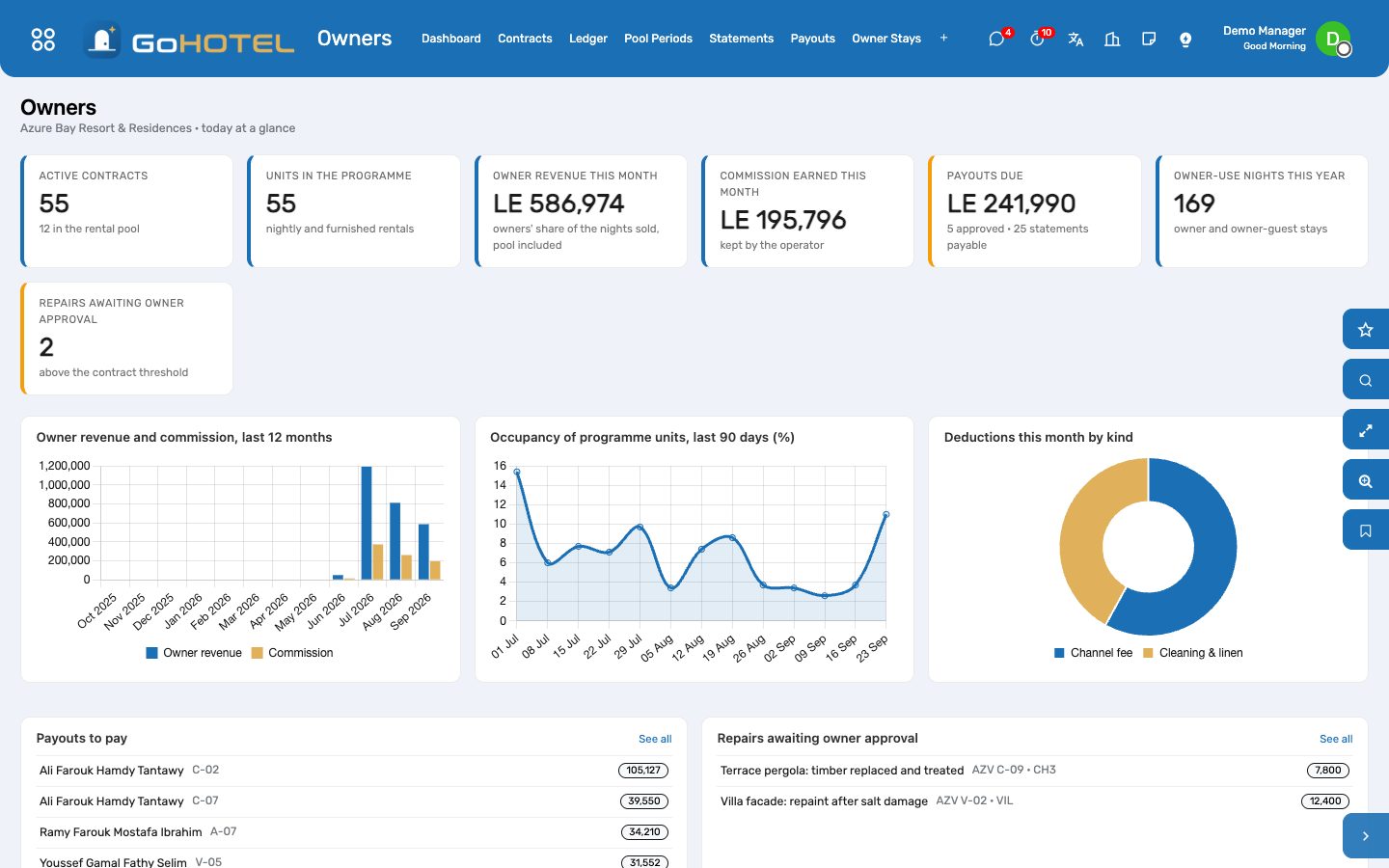
Where:Owners › Dashboard · Contracts · Ledger · Pool Periods · Statements · Payouts · Owner Stays · Work Orders for Owners · Configuration
Before you start
- The units flagged Owner-held and an active ownership account for each (Community › Ownership Accounts).
- A bank journal in Accounting; the Owner funds (trust) journal and the Owner payouts account are created on the first payout, or chosen under Owners › Configuration › Settings.
- The owner-use rate plan of the property (kind Owner use, zero rate) — created the first time an owner stay is booked.
- Blackout dates and pool points by unit type under Owners › Configuration.
How to
Enrol a unit in the programme
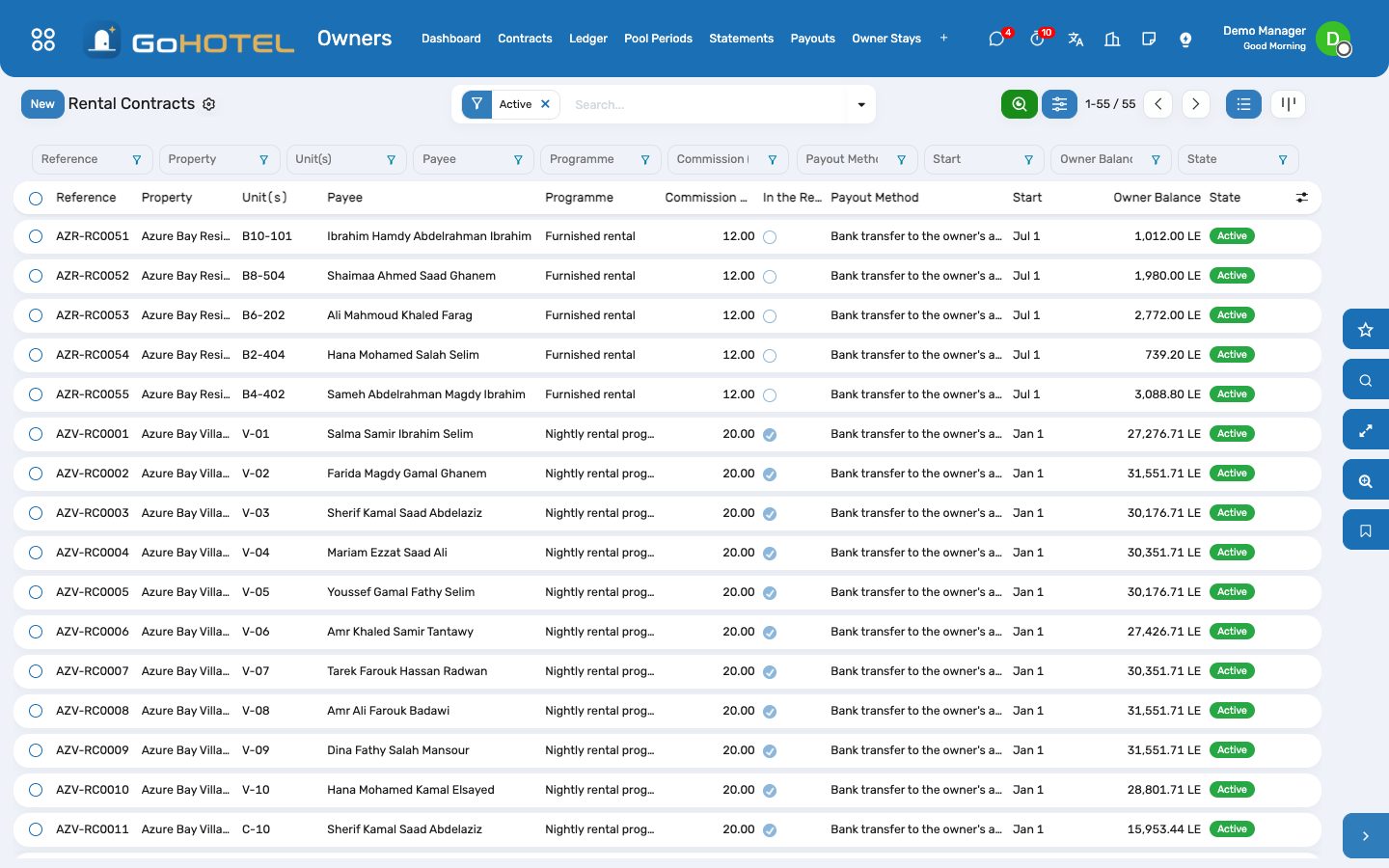
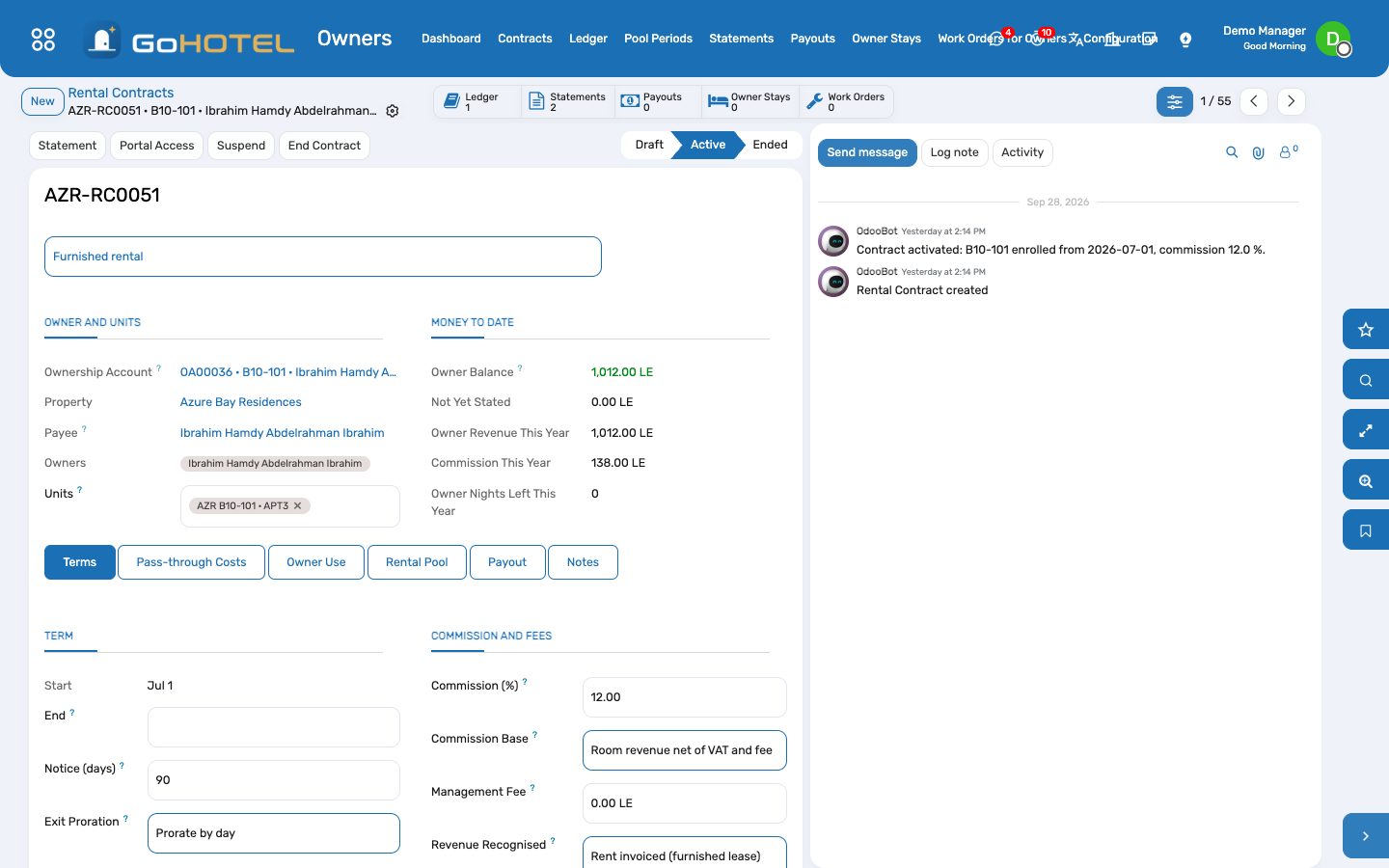
- Owners › Contracts › New: pick the ownership account — the unit, the owners and the payee (the primary owner) follow.
- Programme: Nightly rental programme for a unit sold night by night; Furnished rental for an apartment let on a lease, where the owner earns the rent.
- Terms tab: start and end, notice, the commission and its base (room revenue net of VAT and fees, or gross), an optional monthly management fee, how revenue is recognised (nightly at the night audit, at check-out, or the rent as it is invoiced), the tax to withhold if any, and the repair cost above which the owner must approve.
- Pass-through Costs tab: who bears the channel commission, the cleaning and the linen after each stay, and the utilities — the owner, the operator, or shared with the owner's percentage.
- Activate. A unit can be in one live contract at a time.
Let the ledger fill itself
- Nothing to type: the night audit's Other modules step credits every night sold on a contracted unit — the room revenue on the contract's base, less the commission — and charges the owner their part of the channel commission when the stay came through Booking.com, Expedia or another channel or agent.
- At check-out the cleaning and linen of the stay come off by the contract's split; on the at-check-out basis the whole stay is credited then instead of night by night.
- Furnished rentals are credited from the lease's rent invoices; the management fee, the utilities and the tax withheld are written when the month's statements are made.
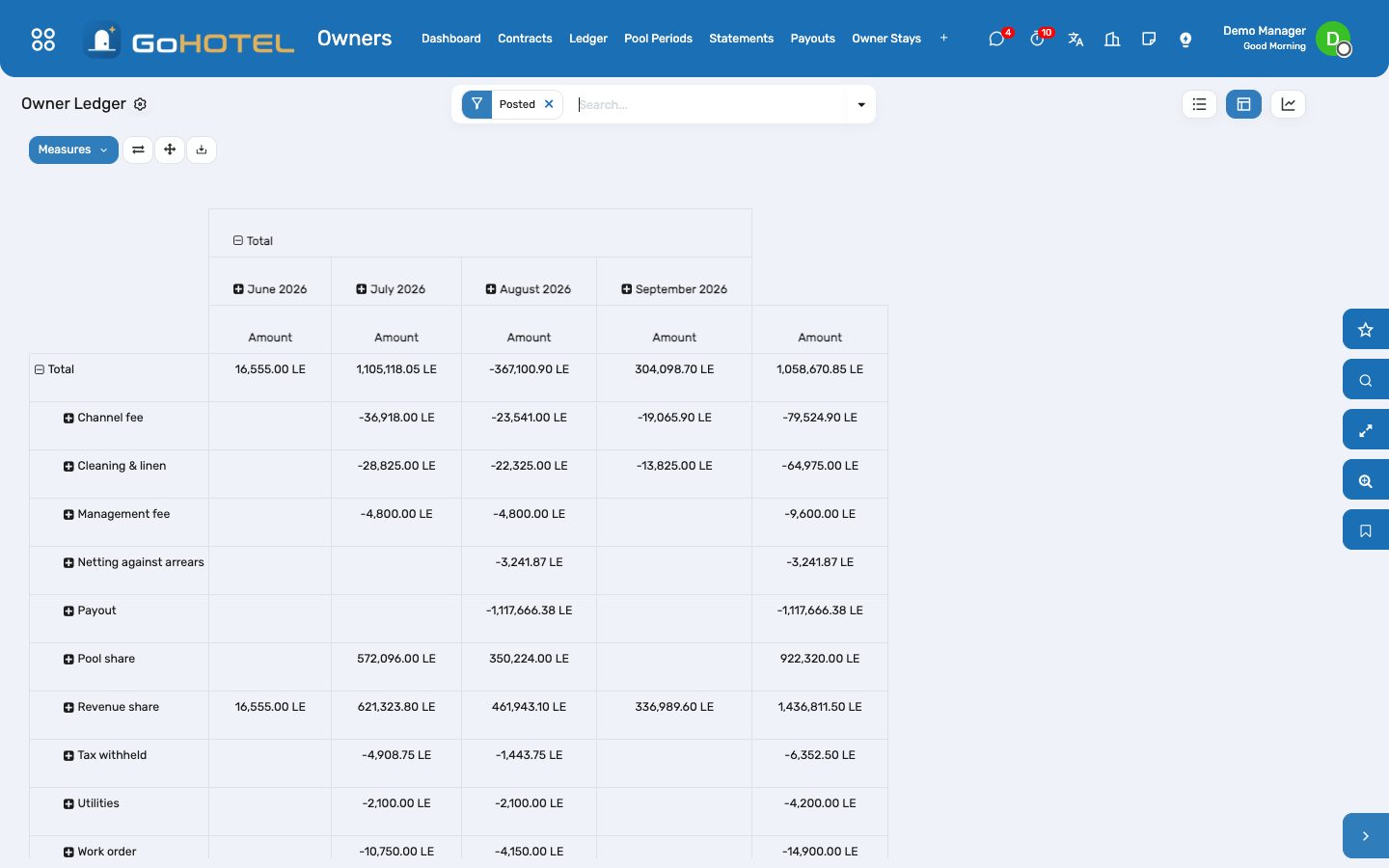
- Owners › Ledger: every line with its date, kind, source and statement. The pivot shows kinds by month; the graph the months stacked. Add an Adjustment and Post it for anything else the owner should see (a goodwill credit, a correction).
Share the rental pool
- Tick In the rental pool on the contracts that pool, with their entitlement points (filled from the unit type's pool points under Configuration, or the area in m²).
- A pool contract's nights go to the pool, not to its owner: each night's revenue less commission and the owners' part of channel fees.
- Owners › Pool Periods › New (or the month-end run on the first of the month): pick the property and the month, Compute — the pooled revenue is shared by points × days in the pool — check the shares, then Post the Shares to the owners' ledgers.
Make and send the statements
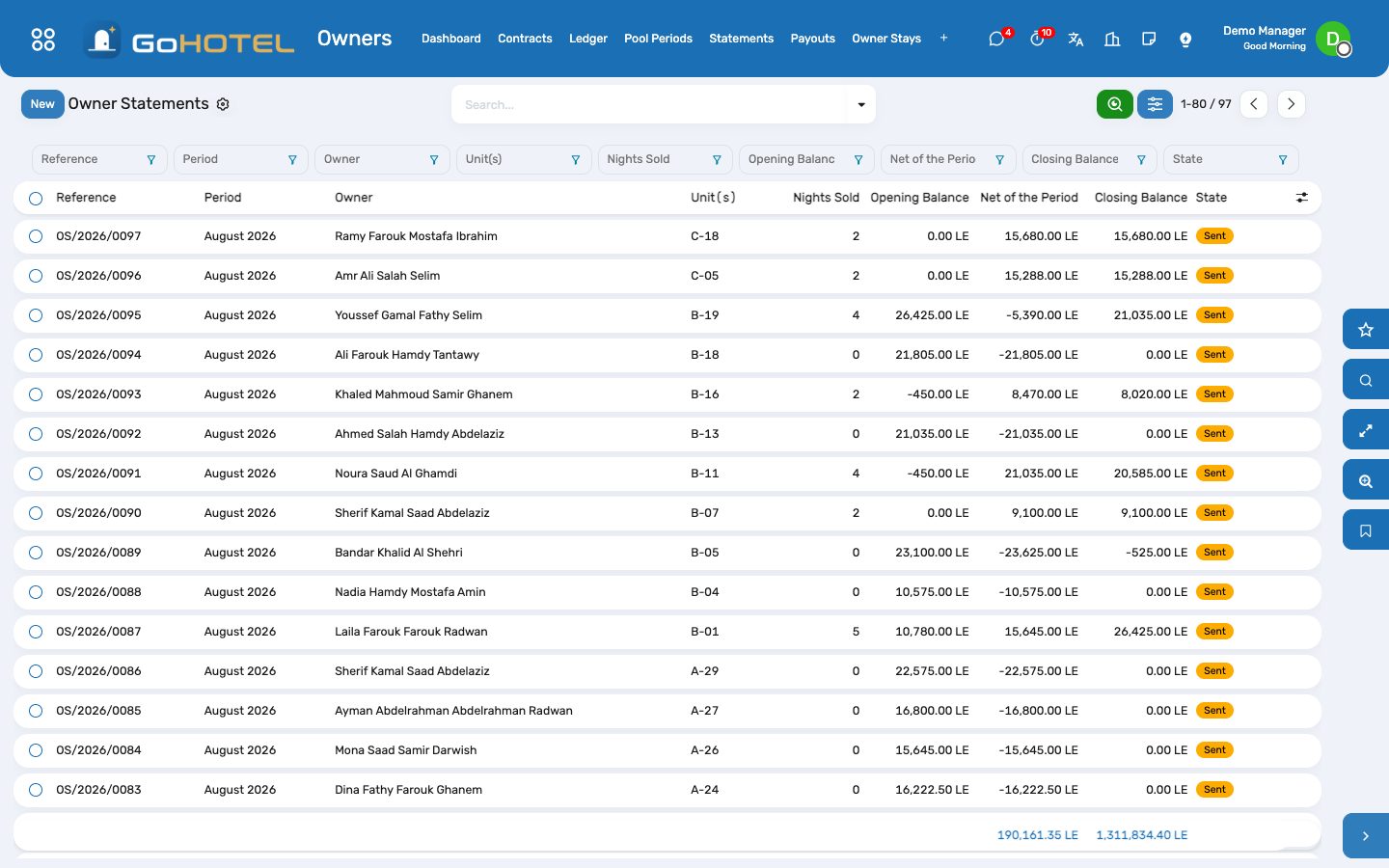
- On the first of the month the month-end run posts last month's pool and drafts the statements; Owners › Statements › Generate Statements does the same for any period and any contracts.
- Each statement opens with the previous closing balance, lists the lines, and closes with opening + lines: positive is due to the owner, negative is carried forward. The Units tab gives nights sold, owner nights, occupancy, ADR and room revenue per unit.
- Send by E-mail queues the owner's e-mail with the PDF on the property's letterhead; the statement also appears on the owner's portal page. Mark as Sent when you hand it over another way.
Pay the owners
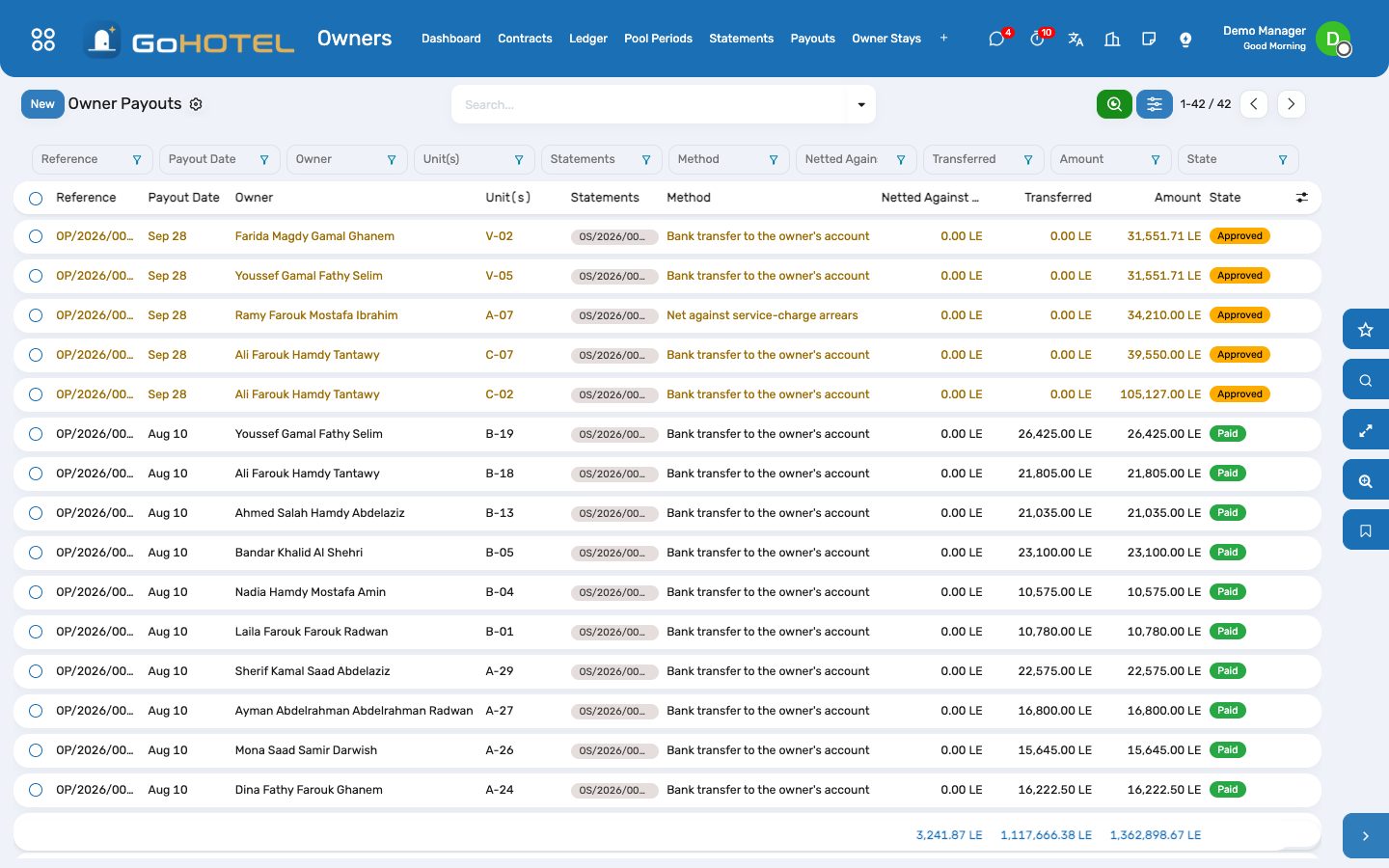
- On a sent statement with a balance due, Create Payout (or select many and Create Payouts). The amount is the closing balance; a quarterly contract is paid on the quarter's last statement.
- Approve, then Pay: a vendor bill to the owner is posted in the Owner funds (trust) journal — the owner's share on the Owner payouts account, the tax withheld on its liability account — and paid through Accounting's own Register Payment from the bank journal.
- Netting: when the owner has signed the consent (Payout tab of the contract: tick the consent; the date is kept), a payout with the Net against service-charge arrears method first settles the owner's open service-charge, levy and late-fee invoices — one entry per invoice in the trust journal, reconciled to that invoice — and transfers the rest.
- The payout writes Payout and Netting lines on the ledger and turns the statements paid.
Owner stays
- From the contract, Book Owner Stay (or Owners › Owner Stays › Book an Owner Stay): the unit, the owner or the owner's guest by name, the dates.
- The stay is checked against the owner's nights left this year, the blackouts of the contract and of the property, the booking notice and the unit's availability, then confirmed at the zero owner-use rate.
- The contract's cleaning charge for owner stays is scheduled on the ledger and posted when the owner leaves; a cancelled or missed stay takes it back.
- A manager can tick Book outside the terms to override the allowance, the blackouts and the notice — never availability.
Repairs charged to owners
- A work order on a contracted unit with Chargeable To = Owner shows the contract and its approval threshold.
- Above the threshold the repair waits: Owner Approval is Pending and the work order cannot move past New Request until the owner approves — on the owner portal, or Owner Approved on the work order when the owner says so by phone.
- Below the threshold no approval is needed. When the work order is done its total cost is a Work order line on the owner's ledger.
Give owners their portal
- On the contract, Portal Access opens Odoo's portal invitation for the owners of the account.
- At /my/owner the owner sees the units, the balance and this year's revenue; a month calendar per unit with guest stays (no names), their own stays, blackouts and out-of-order days; Block my unit; the statements with their PDF; the repairs waiting for approval with Approve and Decline; the payouts.
- An owner sees their own contracts, statements, payouts, ledger and units, and nothing of anyone else's.
Questions the desk asks
Is the owner paid on what the guest paid, or on the room rate?
On the contract's commission base: room revenue net of VAT and fees (the usual base), or gross with fees and VAT. Food, spa and extras never enter the owner's revenue.
Who pays the Booking.com commission?
The contract says: the owner, the operator, or shared with the owner's percentage. The channel's commission on the booking is used when the booking came through the channel manager; otherwise the agent or OTA account's commission %.
The owner owes more than the month earned.
The statement closes negative and the balance is carried to the next one; no payout is made until the balance is due to the owner again.
Can we pay an owner by setting it against the service charge?
Only with the owner's consent recorded on the contract. The payout then settles the open service-charge invoices one by one and transfers what is left.
Where is the money in Accounting?
Guests' money is on the folios and their invoices, owners' money on the vendor bills of the Owner funds (trust) journal and their payments, the community's money on the service-charge invoices. Nothing mixes them.
A night was accrued by mistake.
Post an adjustment for the amount on the owner's ledger with a note; the next statement carries it.
See also: Community: owners, residents and service charges The night audit and the business date Maintenance and engineering